

Note
Go to the end to download the full example code.
Using skore with scikit-learn compatible estimators#
This example shows how to use skore with scikit-learn compatible estimators.
Any model that can be used with the scikit-learn API can be used with skore.
Skore’s EstimatorReport can be used to report on any estimator
that has a fit and predict method.
In fact, skore only requires the predict method if the estimator has already
been fitted.
Note
When computing the ROC AUC or ROC curve for a classification task, the estimator must
have a predict_proba method.
In this example, we showcase a gradient boosting model (XGBoost) and a custom estimator.
Note that this example is not exhaustive; many other scikit-learn compatible models can be used with skore:
More gradient boosting libraries like LightGBM, and CatBoost,
Deep learning frameworks such as Keras and skorch (a wrapper for PyTorch).
etc.
Loading a binary classification dataset#
We generate a synthetic binary classification dataset with only 1,000 samples to keep the computation time reasonable:
from sklearn.datasets import make_classification

X, y = make_classification(n_samples=1_000, random_state=42)
print(f"{X.shape = }")
X.shape = (1000, 20)
We split our data:
from skore import train_test_split

split_data = train_test_split(X, y, random_state=42, as_dict=True)
╭───────────────────────────────── ShuffleTrueWarning ─────────────────────────────────╮
│ We detected that the `shuffle` parameter is set to `True` either explicitly or from  │
│ its default value. In case of time-ordered events (even if they are independent),    │
│ this will result in inflated model performance evaluation because natural drift will │
│ not be taken into account. We recommend setting the shuffle parameter to `False` in  │
│ order to ensure the evaluation process is really representative of your production   │
│ release process.                                                                     │
╰──────────────────────────────────────────────────────────────────────────────────────╯
Gradient-boosted decision trees with XGBoost#
For this binary classification task, we consider a gradient-boosted decision trees model from a library external to scikit-learn. One of the most popular is XGBoost.
from skore import EstimatorReport
from xgboost import XGBClassifier

xgb = XGBClassifier(n_estimators=50, max_depth=3, learning_rate=0.1, random_state=42)

xgb_report = EstimatorReport(xgb, pos_label=1, **split_data)
xgb_report.metrics.summarize().frame()
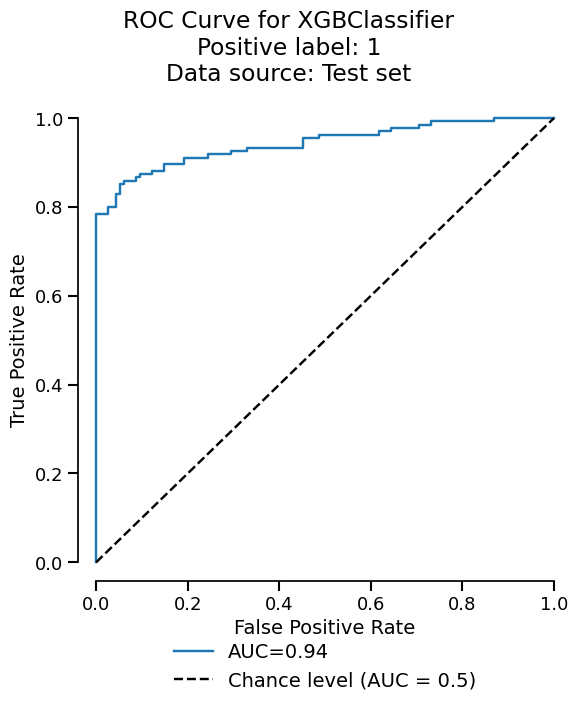
We can easily get the summary of metrics, and also a ROC curve plot for example:
xgb_report.metrics.roc().plot()
We can also inspect our model:
xgb_report.inspection.permutation_importance().frame()
Custom model#
Let us use a custom estimator inspired from the scikit-learn documentation, a nearest neighbor classifier:
import numpy as np
from sklearn.base import BaseEstimator, ClassifierMixin
from sklearn.metrics import euclidean_distances
from sklearn.utils.multiclass import unique_labels
from sklearn.utils.validation import check_is_fitted, validate_data


class CustomClassifier(ClassifierMixin, BaseEstimator):
    def __init__(self):
        pass

    def fit(self, X, y):
        X, y = validate_data(self, X, y)
        self.classes_ = unique_labels(y)
        self.X_ = X
        self.y_ = y
        return self

    def predict(self, X):
        check_is_fitted(self)
        X = validate_data(self, X, reset=False)
        closest = np.argmin(euclidean_distances(X, self.X_), axis=1)
        return self.y_[closest]
Note
The estimator above does not have a predict_proba method, therefore
we cannot display its ROC curve as done previously.
We can now use this model with skore:
custom_report = EstimatorReport(CustomClassifier(), pos_label=1, **split_data)
custom_report.metrics.precision()
0.831858407079646
Conclusion#
This example demonstrates how skore can be used with scikit-learn compatible estimators. This allows practitioners to use consistent reporting and visualization tools across different estimators.
See also
For a practical example of using language models within scikit-learn pipelines,
see Simplified and structured experiment reporting which demonstrates how to use
skrub’s TextEncoder (a language model-based encoder) in a
scikit-learn pipeline for feature engineering.
See also
For an example of wrapping Large Language Models (LLMs) to be compatible with scikit-learn APIs, see the tutorial on Quantifying LLMs Uncertainty with Conformal Predictions. The article demonstrates how to wrap models like Mistral-7B-Instruct in a scikit-learn-compatible interface.
Total running time of the script: (0 minutes 0.351 seconds)